Candidate Tool
Paramount Computer Diagnostic.
A desktop app candidates run to confirm their device and network are ready for remote work. It checks specifications, connectivity, camera, microphone, and network details.
Download
Windows desktop app. Browsers may show a standard executable warning.
Paramount Computer Diagnostics
Last updated: June 26, 2026
Estimated completion time is 5 to 10 minutes. Candidates should use the same email address that received the invitation.
Troubleshooting
Common errors candidates hit in the app, and what to tell them.
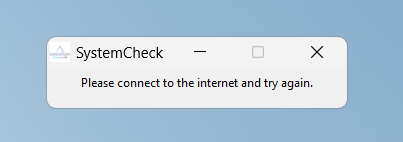
No Internet Connection
Ask the candidate to check their connection, hardwire if possible, and relaunch the app.
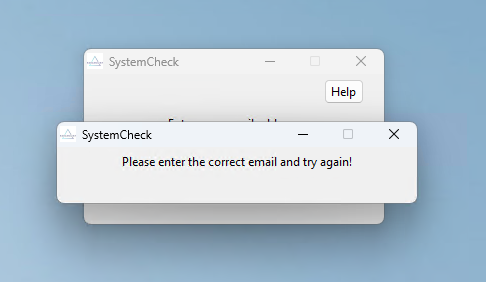
Incorrect Email
Ask the candidate to retry using the email address associated with their Paramount application.
Privacy Policy
Our commitment to your privacy is paramount. This Privacy Policy explains how Paramount Computer Diagnostic collects, uses, and protects information.
Information Collection and Use
Paramount Computer Diagnostic collects data from your device to assess job compatibility and update your Bullhorn profile. The specific information collected includes:
- System Hardware Details: Windows version, machine type, active monitors, free and total RAM, CPU type, processor, cores, hard-drive availability, and antivirus information.
- Network Information: Download and upload speeds, network connection type, and network provider.
- Audio and Video Input Devices: Microphone availability, camera availability, and camera resolution.
- Bullhorn Integration: Collected data may be integrated into your Bullhorn profile using the email address registered with Paramount.
Information Sharing and Disclosure
The collected data is used to evaluate candidate eligibility for specific job positions and is not shared with third parties outside the organization, except as necessary to fulfill job-related requests.
Access to Your Information and Control
You have the right to access, correct, or delete your information. Contact support@hireparamount.com to manage your data.
Security Measures
While we employ security measures to protect your information, avoid transmitting sensitive data through email to mitigate potential risks.
Links to Other Sites
Paramount Computer Diagnostic contains one link to an external site: the app's help/support page, maintained by Paramount.